What makes it walk?
Follow the movement from motor to legs, then find the connections that make it walk.
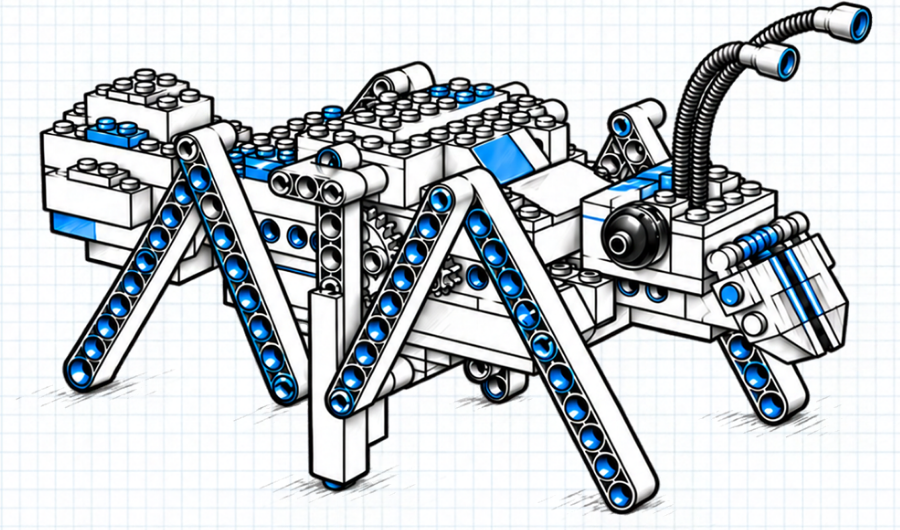
The Walking Ant has six legs and one motor. Switch it on, and the whole model starts moving. But the motor turns an axle. It doesn't take steps. How does that turning movement reach the legs and send your ant across the table?
For our first Engineering Explorers feature, we're taking a closer look at a build that puts that question right in front of you. You can watch it work, stop it, and examine the connections. Each view gives you another piece of the explanation.
01Look: what is moving?
Start with your assembled Walking Ant on a clear, level surface, away from the edge. Switch it on and watch without touching the moving parts.
At first, you'll probably follow the whole ant as it travels. Try watching just one leg instead. Notice where it meets the body, how its position changes, and what happens when it meets the surface underneath it.
Now look closer to the centre of the model. Can you spot something turning? Does it move in the same way as the leg you were watching?
The motor supplies rotation: movement around an axis. The ant's mechanism passes that movement through connected parts to produce its walking motion. You can begin exploring the difference simply by watching what each part does.
Don't worry about naming everything yet. “This part turns” and “that part swings back and forth” are useful observations when you can point out exactly which parts you mean.
Watch the ant again, following a different part this time. Describe its movement without using the word “walk.”
02Trace: how does the movement reach the legs?
Switch off the power before handling the model. The ant uses a strong N20 gearbox motor, so keep fingers clear whenever it is running.
If you have an Intro Kit, this is a different motor from its high-speed, lower-torque motor. The Walking Ant Theme Build includes its own N20; your Intro Kit supplies the power and other required components.
Look for the connections between the motor and the legs. The motor drives a linkage: a set of connected parts that passes movement along. The way those parts connect determines how they can move together.

Choose one visible connection and follow it to the next. Where does a part attach? Where can it turn or pivot? Which part does it connect to after that?
You don't have to take the ant apart to begin. Look from another angle, or compare the model with its assembly diagrams. If a connection is hidden, mark it as a question in a sketch. You can come back to it rather than guess.
The battery and motor have different jobs here. The battery supplies electrical energy; the motor turns that energy into rotation. To explain the walking, you also need to follow the mechanical connections beyond the motor.
With the power off, point out a path from the motor towards one leg. Draw arrows between the parts you can identify. Leave a question mark wherever you lose the path.
03Explain: what supports your idea?
Now try explaining what you found to someone else. Use the model or your sketch to help.

These three prompts give you a place to start:
I noticed… Describe something you actually saw move.
I think it moves because… Explain how you think the connected parts pass movement along.
My evidence is… Point to the part or connection that supports your explanation.
“The legs move because there's a motor” is a start. Can you fill in one of the steps between the motor and a leg?
Seeing two parts move at the same time is a clue. Showing where they connect makes your explanation stronger. If you're unsure, set the model down, keep your hands clear, and watch that connection during another run. Then switch off before looking closely again.
If the ant isn't moving as expected, start with the assembly diagrams and our motor troubleshooting guide. One thing we see often: if a back leg is folded under too far, it can stop the ant from walking. Check the legs before anything else. Once it runs, return to the same question: how does movement travel through the build?
Follow another kind of movement
A fan spins. A car rolls. The ant walks. A motor can provide rotation for each, while the parts around it put that rotation to different uses.
Next time you finish a moving build, pick one part and follow its connections. What turns? What moves differently? And which connection makes that change possible?
We want SparkBlocks builds to give you something to explore after the last brick is in place. A walking creature is fun to make. Figuring out how it walks gives you ideas to take into your next creation.
Seeing two parts move at the same time is a clue.

For families who want to explore together
The Walking Ant Theme Build includes its own N20; your Intro Kit supplies the power and other required components.
See the Walking Ant Theme Build